
Built-in Workflows
Murmur ships with six workflows. Each is pre-assigned to the apps where its style makes sense, and each can be customized — you can add or remove trigger apps, change formality, and add your own instructions. See Customizing Workflows.
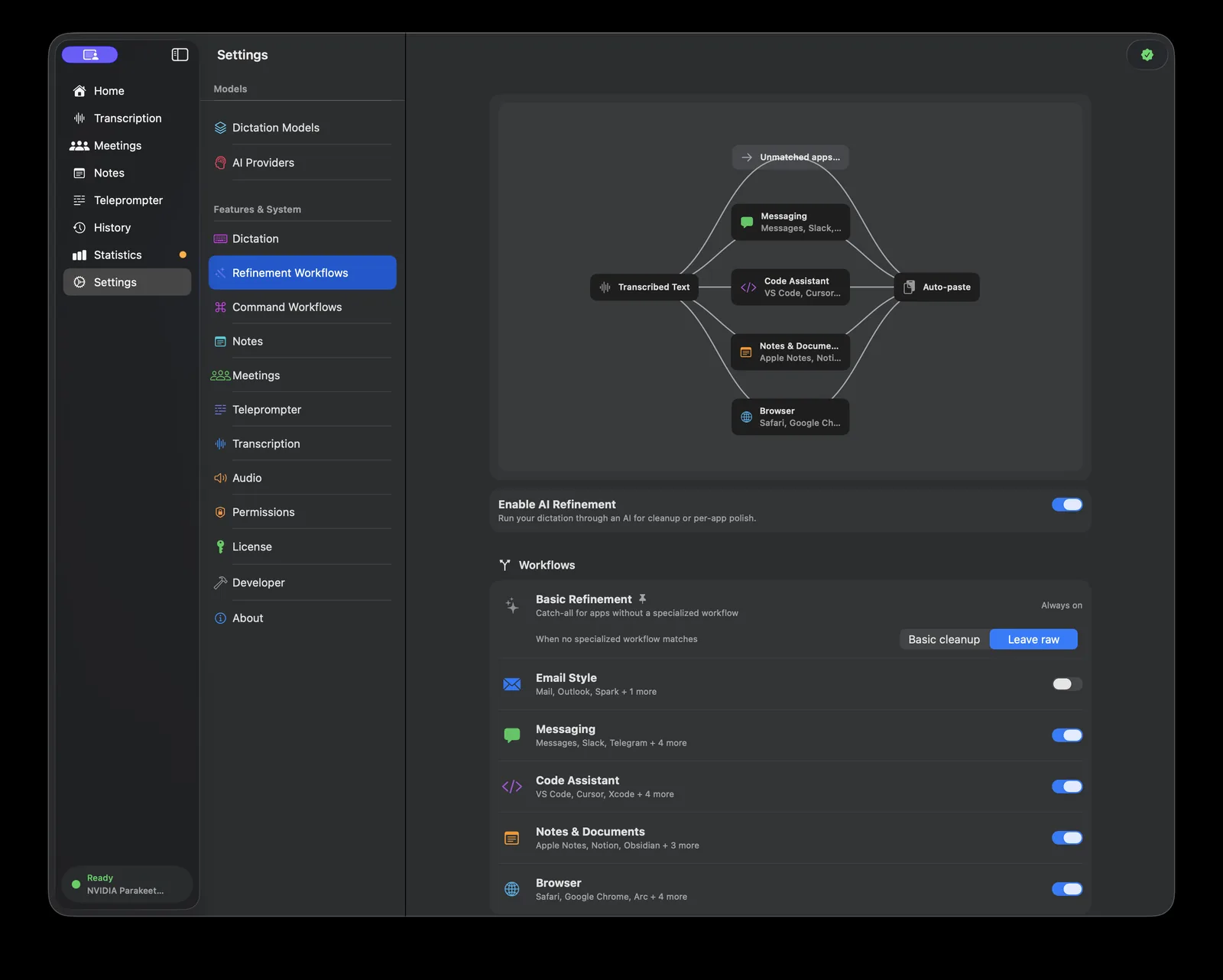
Basic Refinement
The always-on catch-all. When no specialized workflow matches the app you are in, Basic Refinement handles the dictation. It fixes grammar, punctuation, and spelling without restructuring what you said — your words stay your words, just cleaned up.
Basic Refinement is pinned with an Always on badge and cannot be deleted or disabled. It does have one choice, shown directly on its card:
- Basic cleanup (default) — apply the light cleanup described above
- Leave raw — skip refinement entirely for unmatched apps and paste the transcription untouched
Email Style
Professional, well-structured email composition.
- Default apps: Mail, Outlook, Spark, Mimestream
- Default formality: Professional
Spoken fragments become complete sentences with proper paragraphs and an email-appropriate register.
Messaging
Conversational, short-form messages that sound like you typed them.
- Default apps: Messages, Slack, Telegram, Discord, WhatsApp, Signal, Microsoft Teams
- Default formality: Neutral
Keeps things brief and casual rather than formalizing your chat messages into prose.
Code Assistant
Technical dictation for developers.
- Default apps: VS Code, Cursor, Xcode, Terminal, iTerm2, Warp, IntelliJ IDEA
- Default formality: Neutral
Recognizes and preserves technical vocabulary — API, JSON, async/await, package names — instead of "correcting" it into ordinary English. Useful for writing commit messages, code comments, and instructions to AI coding tools by voice.
Notes & Documents
Long-form prose with natural paragraph flow.
- Default apps: Apple Notes, Notion, Obsidian, Bear, Pages, TextEdit
- Default formality: Neutral
Optimized for thinking out loud: stream-of-consciousness dictation comes out as readable, structured writing.
Browser
Context-adaptive refinement for everything that happens in a browser tab.
- Default apps: Safari, Google Chrome, Arc, Microsoft Edge, Brave, Firefox, Vivaldi
- Default formality: Neutral
A browser can be a webmail client, GitHub, a CMS, or a chat app. The Browser workflow reads the page URL and title (see Context-Aware AI) and infers the appropriate style — email tone on Gmail, technical tone on GitHub.
How matching is resolved
When several workflows could apply, Murmur picks in this order:
- Custom workflow with an exact app match
- Built-in workflow with an exact app match
- Built-in workflow matching the app's category
- Basic Refinement
Disabling a workflow with its toggle removes it from this cascade; apps it covered fall through to the next match. An app can only be assigned to one workflow at a time — assigning it elsewhere moves it.